
Chrome's desktop version has received two desired new features: vertical tabs and an improved immersive reading mode.
According to Google, this is one of the biggest user interface changes in Chrome's history, as the traditional horizontal orientation of tabs has been in use since the browser's early days. At the same time, Chrome is catching up with other browsers, as vertical tabs, which are placed on the side, have already arrived in most of its competitors.
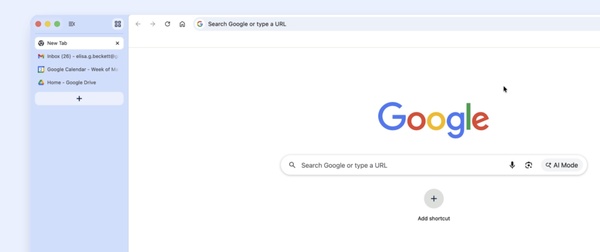
Vertical tabs offer an alternative to the traditional tab bar. In the new view, all open tabs are listed on the left side of the browser window, allowing website titles to be seen better - even when many tabs are open. This particularly eases the workflow for users who use many tabs simultaneously. The view can also be condensed into mere icons, so that the side tabs do not consume as much browser screen real estate.
Enabling the feature is simple: the user only needs to right-click the top of the browser window and select "Show tabs vertically" from the menu. Returning to the traditional horizontal tab bar is done in the same way.
The second update is an "immersive" reading mode, which is not a new function per se, but an improved version of the reading mode already present in Chrome. The new function expands the reading mode to the size of the entire browser window, removing extra visual elements from web pages and focusing solely on text. Reading mode can be activated either from the right-click menu or from a separate reading mode icon found in the address bar.
Both updates are already being rolled out and will gradually become available to all desktop users, across all supported operating systems (Windows, macOS, Linux, ChromeOS).
Vertical tabs offer an alternative to the traditional tab bar. In the new view, all open tabs are listed on the left side of the browser window, allowing website titles to be seen better - even when many tabs are open. This particularly eases the workflow for users who use many tabs simultaneously. The view can also be condensed into mere icons, so that the side tabs do not consume as much browser screen real estate.
Enabling the feature is simple: the user only needs to right-click the top of the browser window and select "Show tabs vertically" from the menu. Returning to the traditional horizontal tab bar is done in the same way.
The second update is an "immersive" reading mode, which is not a new function per se, but an improved version of the reading mode already present in Chrome. The new function expands the reading mode to the size of the entire browser window, removing extra visual elements from web pages and focusing solely on text. Reading mode can be activated either from the right-click menu or from a separate reading mode icon found in the address bar.
Both updates are already being rolled out and will gradually become available to all desktop users, across all supported operating systems (Windows, macOS, Linux, ChromeOS).




